
40+ Incredibly Useful WordPress Plugins
Plugins are a great way to add additional functionality to your WordPress website. Below you’ll find our list of recommended plugins that we install on a regular basis for many of our clients. The majority of these are free. Paid plugins are noted. Everything listed here is something we’ve worked with extensively. If you need help setting any of them up, drop us a line. Updated January 2018.
 If your site has a blog and is open to public comments, Akismet will help you ward off spammers and bots that scan the web looking for unprotected blogs to post links on. WordPress lets you approve/disapprove comments manually, but this plugin will only let the ones that aren’t spam through for your review. Very helpful if you don’t have a lot of time.
Jetpack
 Jetpack simplifies managing WordPress sites by giving you visitor stats, security services, speeding up images, and helping you get more traffic. A free wordpress.com account is required.
Contact Form 7
 Simple to use, can manage multiple contact forms, customize the form and the mail contents and more. Simple easy to use markup. If your theme does not already come with some sort of contact form solution, this is a good way to go. Pair it with Really Simple CAPTCHA to prevent your forms from being spammed.
 Duplicate Post
A simple plugin that allows you to clone any post or page, or edit it as a new draft. Very handy on the backend.
Page Links To
 Lets you make a WordPress page that links to an external URL. This is great for creating redirects. For example, if you have an online webinar planned and you want to make it easy to verbally tell people where to register – simply create a page on your site, enter the complicated webinar url into Page Links To, then publish. You can then tell people to go to yoursite.com/webinar to register. It will then redirect them to webinarservice.com/usr/2305/date?35#register (or whatever randomly generated complicated url they give you).
Google XML Sitemaps
 This plugin will generate a special XML sitemap which will help search engines to better index your site and blog. Please note that some SEO plugins such as Yoast SEO have an option to generate XML sitemaps included. Only use this if you’re not using one of those.
 If your WordPress theme is simple and does not include built in shortcodes, then this may be helpful. Easily create tabs, buttons, boxes, different sliders, responsive videos and much more with Shortcodes Ultimate.
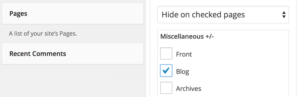 If your theme does not already include the ability to fully control where your widgets display, this is a good solution. This will make it easier to hide widgets on specified pages by adding checkboxes to each widget giving you the option to either show or hide it on every site page.
  Build responsive page layouts with this simple drag and drop page builder. Another good option if your current WordPress theme does not have some sort of builder already built in.
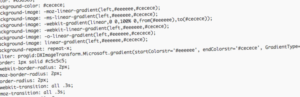 An easy-to-use plugin to add custom CSS styles that override plugin and theme default styles. This is a good plugin to use if your theme does not already have a spot allowing you to add custom css styling codes to manually modify visual elements of your site.
 TablePress allows you to easily create and manage beautiful tables. You can embed the tables into posts, pages, or text widgets with a simple Shortcode. Table data can be edited in a speadsheet-like interface, so no coding is necessary.
 Probably the easiest and most beginner friendly WordPress backup and migration plugin on the market. It allows you to easily schedule daily, weekly, or monthly backups and store them in Dropbox, Amazon S3, Rackspace Cloud, FTP, Stash (their cloud service), and or email it to yourself. You can also use it to migrate an entire site on a new server. We use this on all our installs for clients.
 A premium backup solution. For as little as $5/month you can get daily automatic backups for your WordPress website and database. Quick setup and easy to use. Advanced options are available as your site grows or if you need a more comprehensive solution right from the start. A 14-day free trial is available.
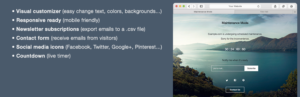 If you need a more advanced maintenance or “coming soon” option, this plugin will give you things like countdown timers, email signups, social media and more.
 Take the guesswork out of WordPress security. iThemes Security offers 30+ ways to lock down WordPress in an easy-to-use WordPress security plugin.
 Wordfence alerts you quickly in the event your site is compromised. Wordfence Security is 100% free and open source. They also have a premium upgrade.
 Memberpress is an easy to use and powerful membership plugin to create and manage subscriptions and access to digital downloads. It integrates well with payment processing services like PayPal, Stripe, Authorize.net, among others. It also integrates very well with autoresponders like MailChimp, Aweber and more. It’s a very good cost-effective solution to creating a protected member site. A basic license for a single membership site will cost you $99/year. The Developer license is currently $199/year, which allows you the ability to install it on unlimited sites. If you haven’t noticed already, we use Memberpress for our site.
 WooCommerce Memberships is a site-wide membership solution that brings your content, shop, and memberships together. If you have an online store using the popular WooCommerce plugin, their membership solutions integrates seamlessly. There is a bit of a learning curve, but once you get to know the system, you’re golden. While WooCommerce is free, the Memberships add-on is a premium plugin that will cost $149/year. If you want to take recurring payments, you’ll probably also want their
 Yoast SEO is the complete website optimization package. Apart from adding titles and descriptions to your articles, it also allows you to do page analysis, add open graph meta data, publish an xml sitemap, and much much more. It’s very easy to use. We put this on all sites that we develop.
 One of the most downloaded plugins for WordPress. Use All in One SEO Pack to automatically optimize your site for Search Engines. Great of the box, better with the Pro version.
 bbPress is a community forum solution that is focused on ease of integration, ease of use, web standards, and speed. Best of all, it was created by the makers of WordPress itself.
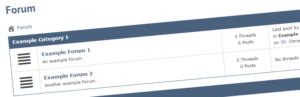 Asgaros Forum is a very good option to extend your website with a lightweight discussion board. It is easy to set up and manage, integrates perfectly with WordPress and comes with a small amount of features which makes it fast and simple.
 BuddyPress helps you build any type of community website using WordPress, with member profiles, activity streams, user groups, messaging, and more.
  The Events Calendar is a carefully crafted, extensible plugin that lets you easily share your events. It’s probably the most popular events calendar for WordPress, but can also be quite costly with all the add-ons. This is a premium plugin.
 Social Warfare helps you get your content shared the way you want it to be shared. Get more shares and drive more traffic now with the best sharing plugin for WordPress! Not only will it never slow down your website like other sharing plugins, you’ll get the most attractive buttons available that look great no matter what screen size or resolution.
 WooCommerce is currently the leader in WordPress-based shopping cart plugins. You can use it to sell a single product to a full online store full of thousands of items. They have hundreds of free and premium extensions that will take it even further.

 Easy Digital Downloads is a complete e-commerce solution for selling digital and other non-physical products in a light, performant, and easy to use plugin. Rather than attempting to provide every feature under the sun, Easy Digital Downloads makes selling digital simple and complete by providing just the features you need.

 If you’re looking for a more advanced caching plugin, W3 Total Cache and WP Super Cache are two of the most widely used solutions. There is a bit of a learning curve on these and we’ve seen lots of people break their sites by accidentally using the wrong settings, so be sure to read all the documentation.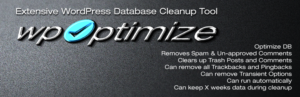
 A simple and easy way to test your theme for all the latest WordPress standards and practices.
Great services we love –
and actually use!

Automate your Pinterest presence. Get one month free with a $15 credit!

We highly recommend Social Warfare - the only sharing plugin we've seen that doesn't slow down a site.
Want more?
Get instant access to our free online library and toolbox full of helpful time-saving ebooks, printable checklists, royalty-free graphics, training videos, templates, shareable social media images, and much more! We’re pretty confident you’ll find something useful in there that will help you build your business online!
Already a member? Awesome! Login >>